
Café & Restaurant Management
Run your whole café
from one screen
Point of sale, live stock, accounting, payroll, QR menu and customer loyalty — one system, every branch, with the books kept correctly as you sell.
15 days free · No card · Arabic & English
- Keeps selling offline
- UAE VAT 201, box by box
- Arabic and English, every screen
- On the tablet you already have
- Restaurant POS UAE
- Café POS Dubai
- Kitchen display system
- QR menu
- Waiter tablet
- Table calling
- UAE VAT 201
- Arabic POS
- Recipe stock
- Loyalty program
- Mall sales reporting
- Offline till
- Self-order kiosk
- Multi-branch
- ZATCA e-invoicing
- POS Saudi Arabia
- Kuwait, Bahrain and Oman dinars
- Franchise groups
Live order
Watch one order travel
From the table to the till, the kitchen, the waiter and the books — one order, every screen, in seconds.
Till and kitchen
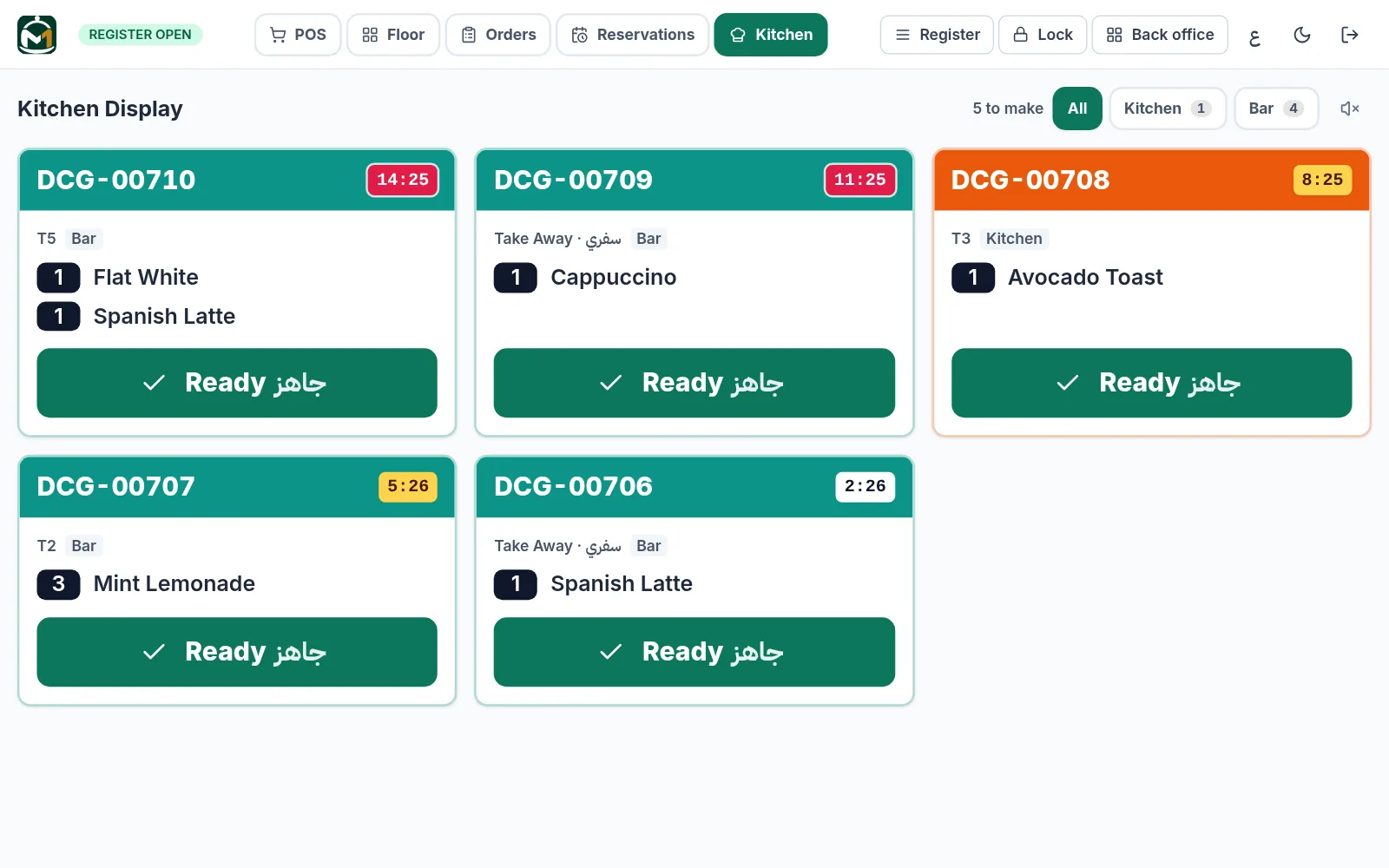
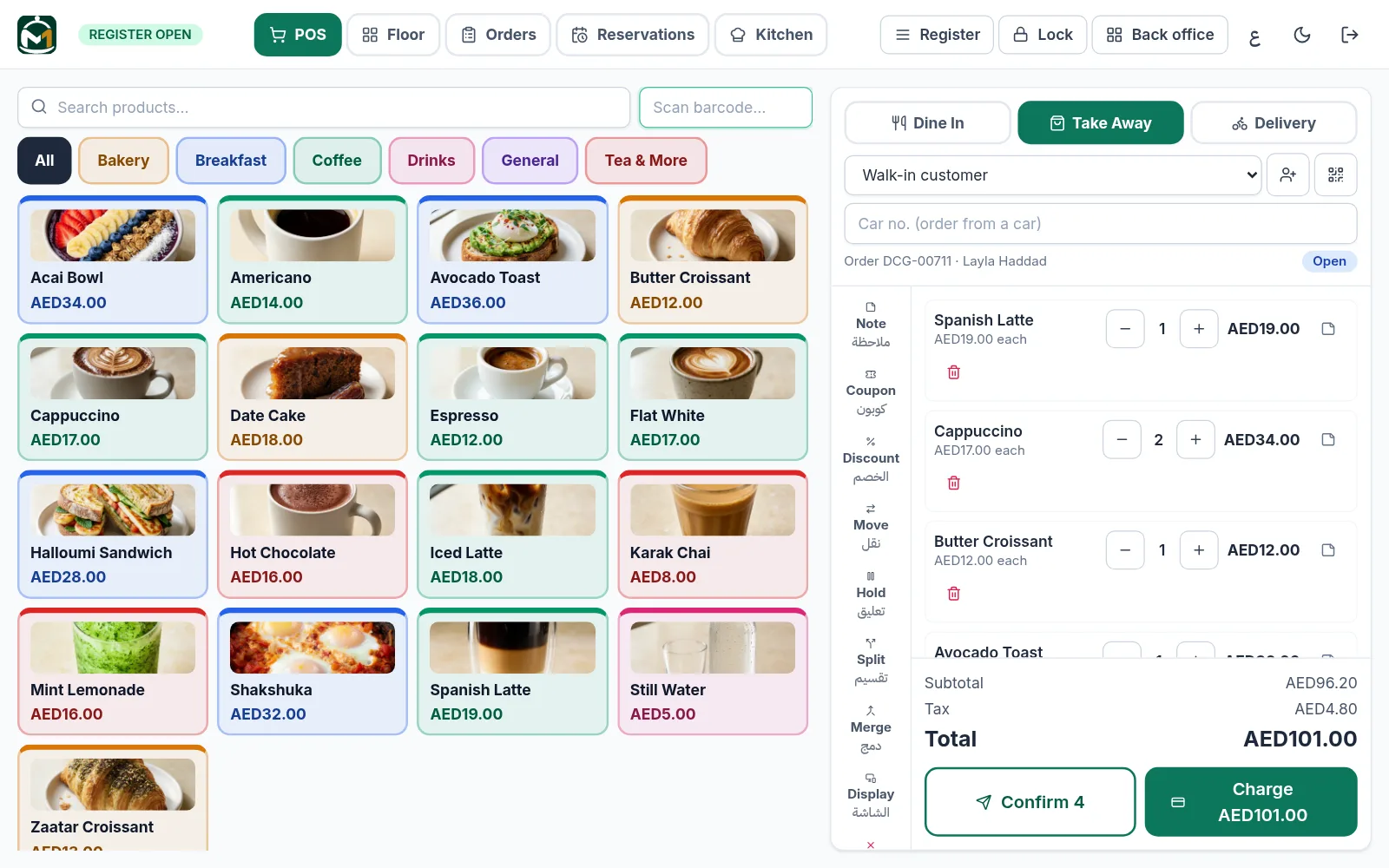
Take the order once. The kitchen hears it.
Every order goes to the right station the moment it is fired — a screen on the pass, a printer at the bar, or both.
- A chime that keeps ringing until someone starts the order
- Timers turn amber and red at the limits you set
- Dine-in, takeaway, delivery, split bills and tips
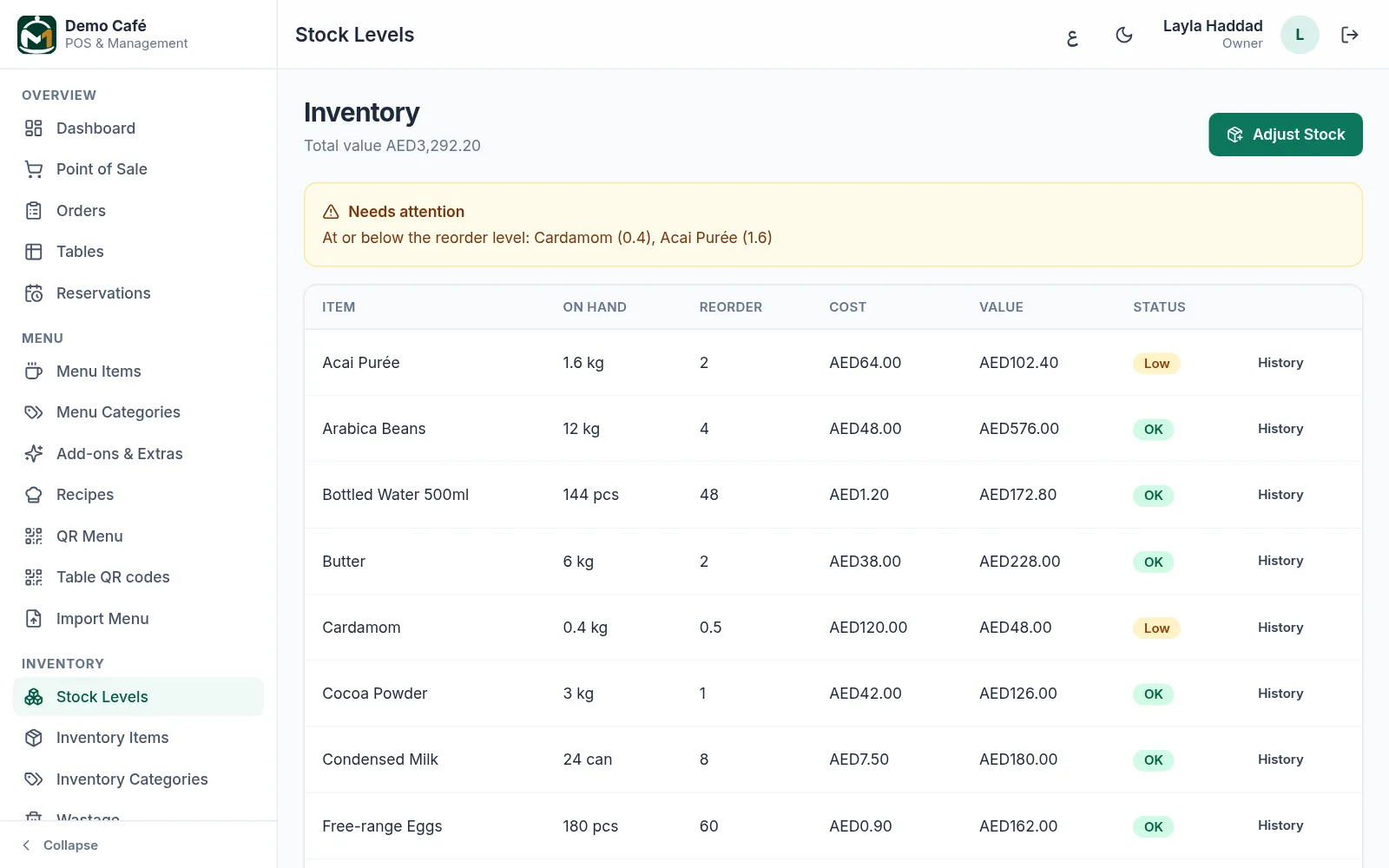
Stock and recipes
Every sale counts the stock
Build a drink or a dish from its ingredients once, and every sale takes them off the shelf — so the cost of what you sold is known, not guessed.
- Low-stock and out-of-stock alerts
- Purchases, suppliers and stock counts
- Stock per branch, with transfers between them
Books and VAT
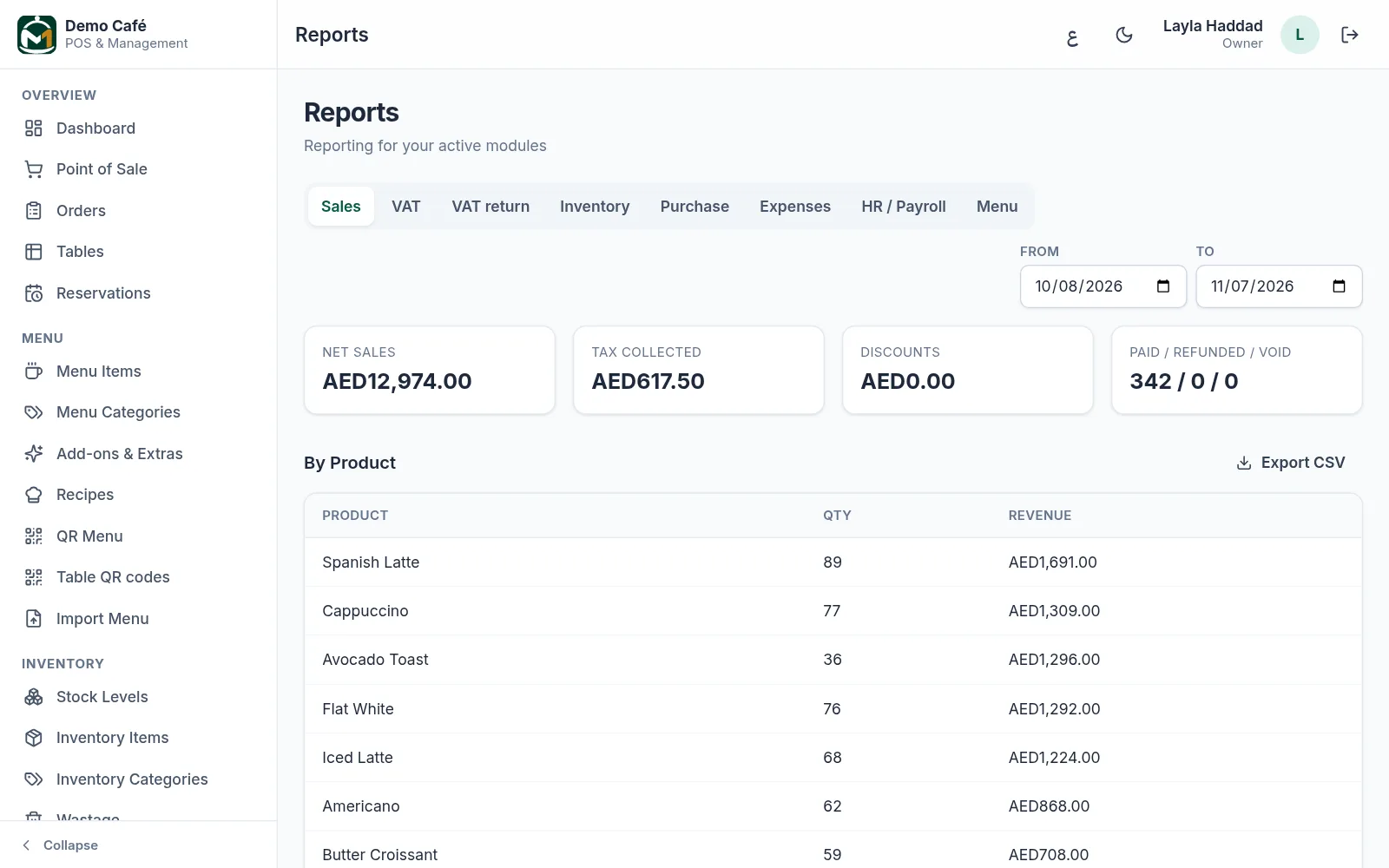
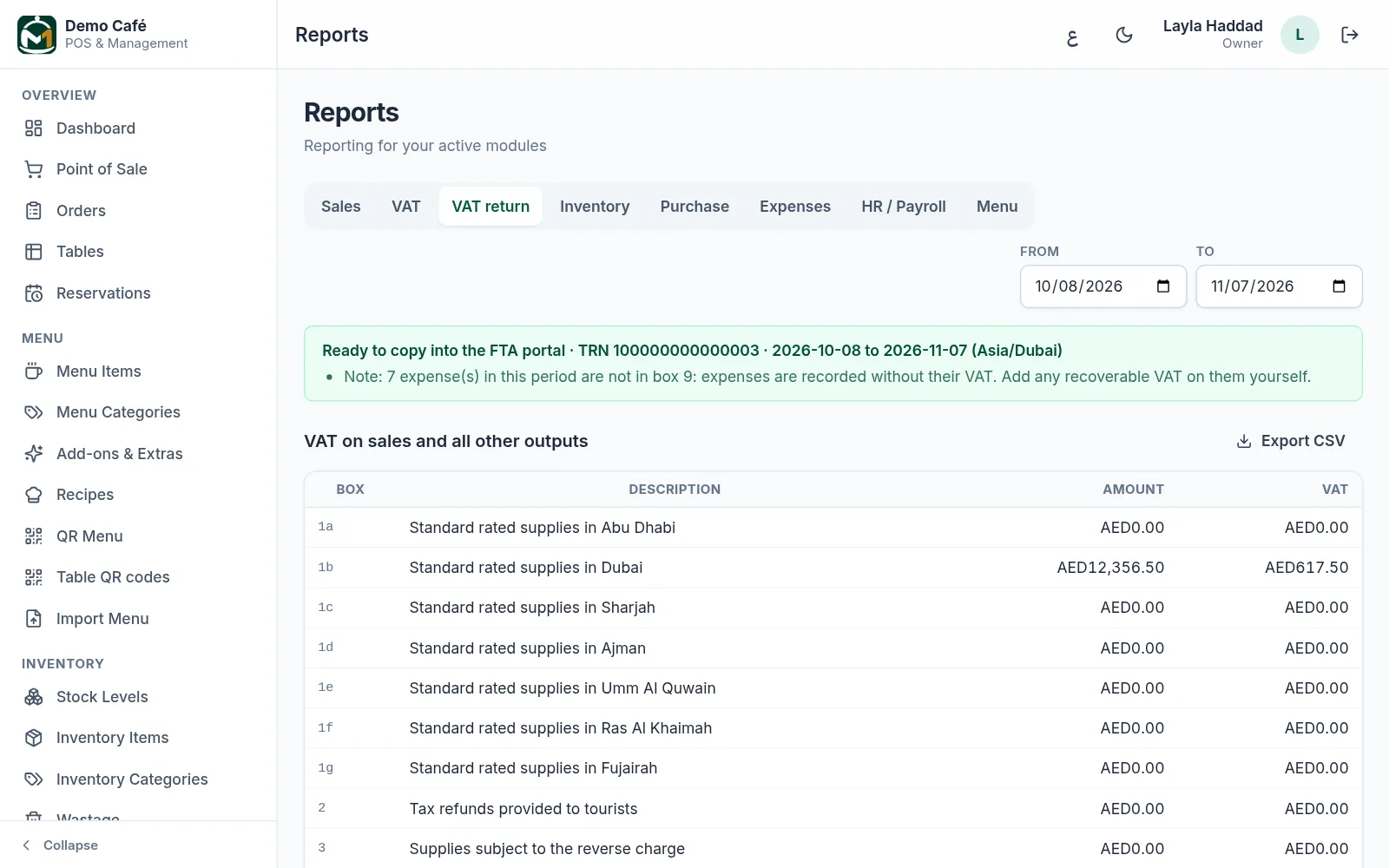
The VAT return, box by box
Sales, purchases, expenses and payroll post to real double-entry books, and the UAE VAT 201 is laid out box by box — split by emirate, with refunds in the period they happen.
- Standard, zero-rated, exempt and out-of-scope kept apart
- Profit and loss, balance sheet and trial balance
- X and Z reports for every register
Across the Gulf
Six countries, each done its own way
Choose your country when you sign up: M1Serve starts in its currency, decimals, time zone and tax. ZATCA e-invoicing for Saudi Arabia, the Bahrain and Oman VAT returns, and franchise groups for cafés in more than one country.
- Three decimals where the money has them
- ZATCA e-invoicing as an add-on
- One login across a group's cafés
- United Arab EmiratesAED 18.00VAT 5%VAT 201, box by box, by emirate
- Saudi ArabiaSAR 18.00VAT 15%ZATCA e-invoicing (add-on)
- BahrainBHD 1.850VAT 10%NBR VAT return, box by box
- OmanOMR 1.750VAT 5%Tax Authority VAT return, box by box
- KuwaitKWD 1.250No VATSales and books in dinars
- QatarQAR 18.00No VATSales and books in riyals
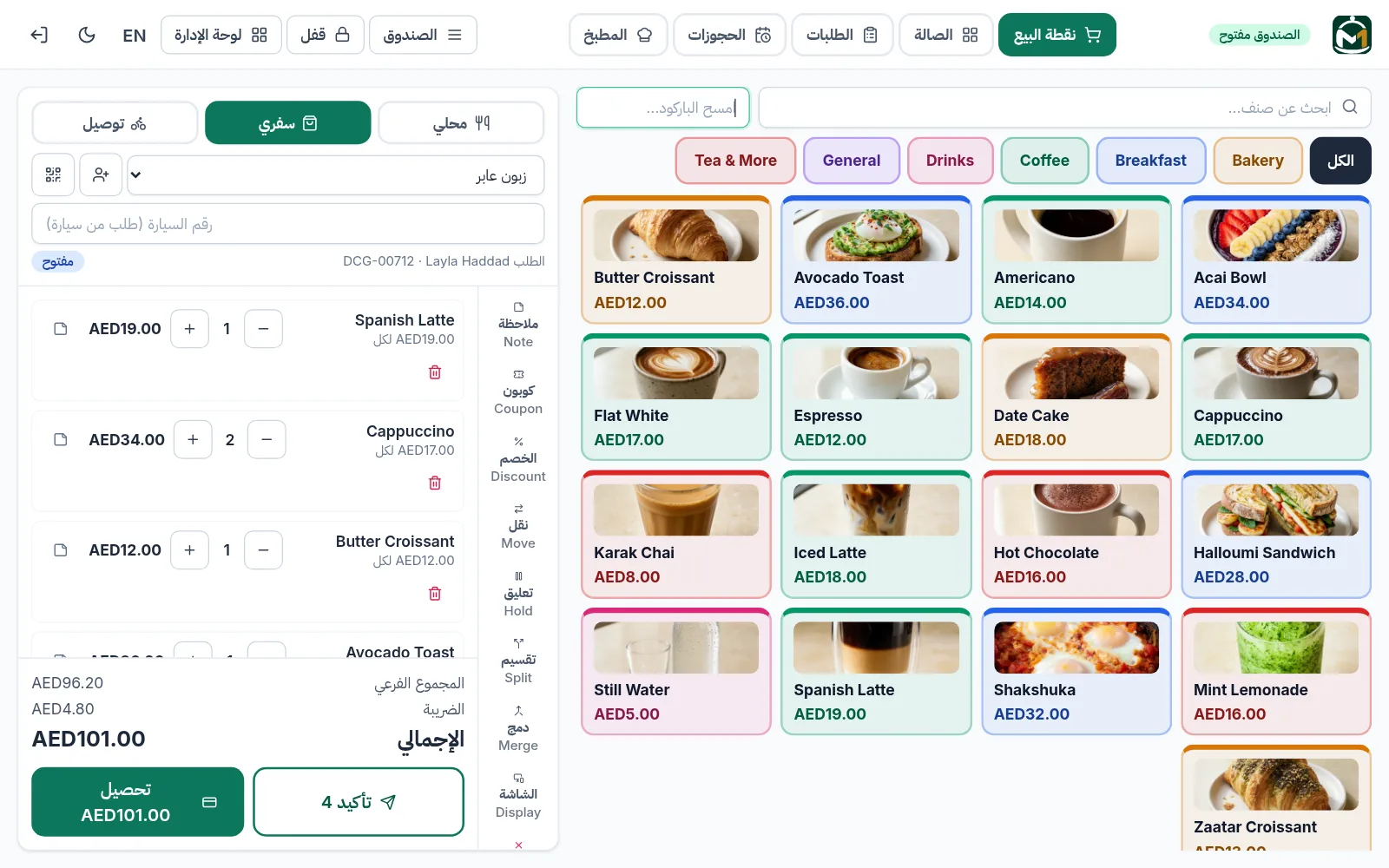
Arabic, end to end
Your team works in the language they read
The till, the kitchen screen, the floor and the back office all switch to Arabic, right to left, on each device — and bills can print in two languages.
- Switch per device, not per business
- Arabic dates, with numbers kept readable
- A customer's receipt in their language
QR menu and loyalty
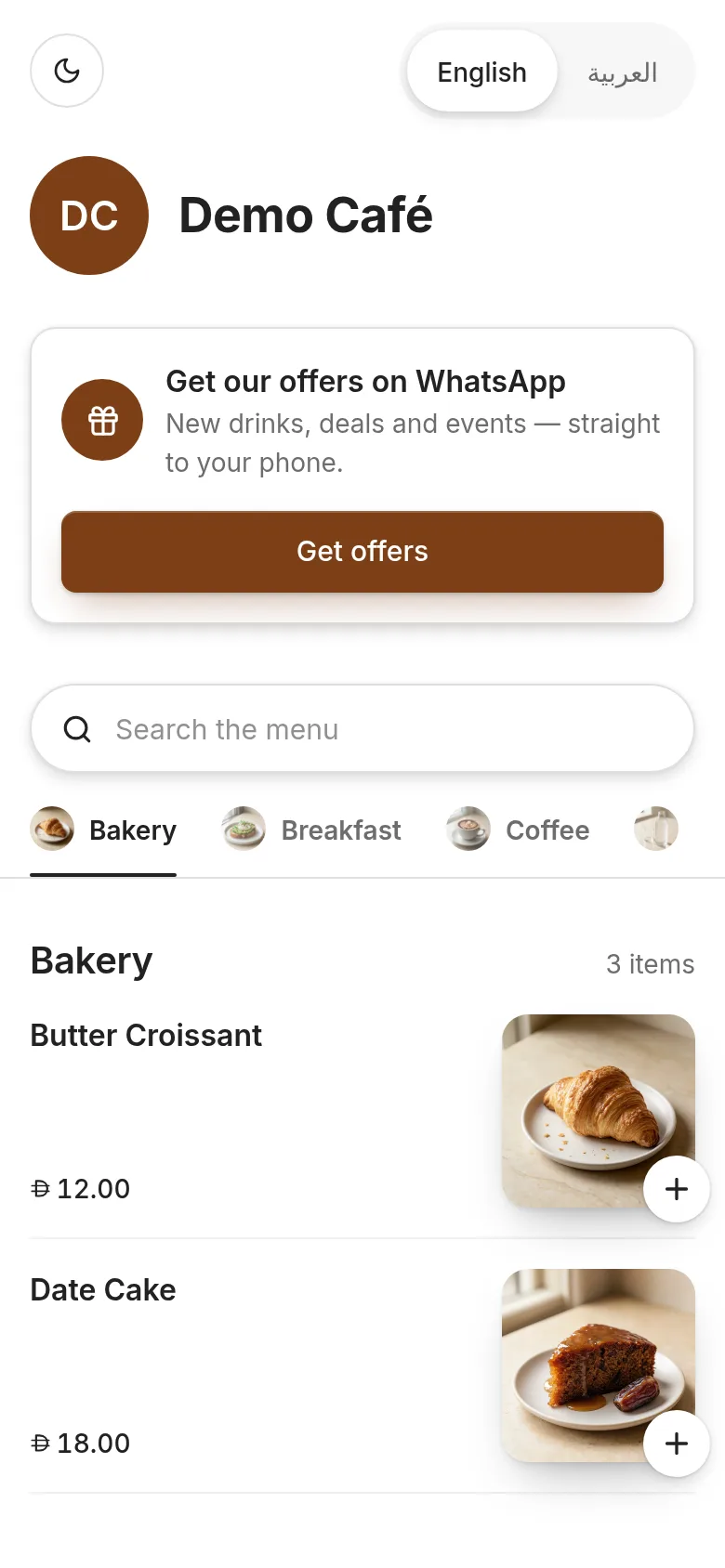
A menu guests open with their camera
A scan-to-view menu with photos, allergens and every language you add — and one loyalty card per customer across every shop you run.
- Menu changes show at once — nothing to reprint
- Points kept per shop, checked by the customer
- Table bookings the café confirms
Waiter tablet · Add-on
The table calls. The floor hears it.
One shared tablet for the floor: each waiter unlocks it with their own PIN and takes the order at the table. Guests tap Call waiter or Bill please on the table's QR menu, and that table flashes until someone answers.
- Every order under the waiter who took it
- Locks itself after three idle minutes
- Calls show on every waiter's tablet, with a chime
Mall sales reporting
Your mall reads the daily sales by itself
Malls ask their tenants for daily sales. Give the leasing team a read-only key and their system reads your daily totals directly — no spreadsheets, and nothing else of yours.
- Orders, net sales, VAT and refunds per day
- One branch or all of them
- Revoke the key in one tap
Everything the shop needs
Not a till with add-ons bolted on — one system where the sale, the stock and the books are the same event.
Fast counter POS
Dine-in, takeaway and delivery tickets with holds, splits, add-ons, tips, discounts and multi-payment. Built for one-handed use during a rush.
Names on the cups
A sticker for every cup with the guest's name, the drink and the extras they chose, printed the moment the order is sent.
A kitchen screen that rings
Every docket still to make on one board, oldest first: a chime as each one arrives, timers that turn amber and red at the limits you set, and a single Ready.
Recipe-level stock
Every sale deducts its ingredients, so on-hand quantities and true cost of goods stay right without constant stock-takes.
Real double-entry books
Chart of accounts, journals, ledger, trial balance, P&L, balance sheet and cash flow — posted from operations, each payment type to its own account.
UAE VAT return, box by box
Standard, zero-rated, exempt and out-of-scope kept apart on every line, and the VAT 201 laid out box by box — split by emirate, refunds in the period they happen.
Arabic, end to end
The till, kitchen screen, floor and back office all switch to Arabic, right to left, per device. Bills can print in two languages.
Bring your menu with you
Import your menu and customers from Loyverse or any spreadsheet. Preview first, nothing duplicated on a re-import, and every import can be undone.
Multilingual QR menu
A modern scan-to-view menu with photos, allergens and any language you add yourself — including full right-to-left support.
Loyalty that travels
One membership QR per customer across every shop, with points kept separately per shop. Customers check their balance in their own portal.
Staff, shifts and payroll
Attendance, advances and loans, monthly payroll runs with automatic loan recovery, and payslips your team can actually read.
Multi-branch from day one
Per-branch stock, purchasing, registers and reports — deliveries land at the branch they were ordered for, and every branch sits side by side.
Permissions you control
Build your own roles with a per-button permission matrix, pin staff to a branch, and cap discounts. PIN-authorised voids are logged.
A shared waiter tablet
One tablet for the floor: each waiter unlocks it with their own PIN and takes the order at the table. It locks itself when it is put down. An add-on, per tablet.
Tables that call
Guests tap Call waiter or Bill please on the menu from their table's QR code, and the table flashes on the waiter's floor until someone answers.
Mall sales reporting
Give your mall's leasing team a read-only key to your daily totals — orders, net sales, VAT and refunds — and revoke it whenever you like.
A screen for each job
The till, floor and kitchen addresses open only their own screens, whoever signs in. The back office lives at m1serve.com alone.
Prints by itself, on Windows
The M1Serve Printer app installs itself on any Windows PC from Windows 7 up, starts with it, and prints kitchen and bar tickets, bills, cup stickers and the X and Z reports.
A board for the queue
The customer display shows the bill while it is rung up, then the Preparing and Ready order numbers in English and Arabic, so guests know when to collect.
Every Gulf currency
Choose your country at sign-up and M1Serve starts in its currency and time zone. Kuwaiti and Bahraini dinars and the Omani rial keep all three decimals, from the till to the books.
ZATCA e-invoicing
For Saudi Arabia, an add-on: every paid bill is signed as a simplified tax invoice with ZATCA's QR code and reported to Fatoora. Refunds become credit notes.
Bahrain and Oman VAT returns
The NBR and Oman Tax Authority returns laid out box by box in each form's own order, from the same books as the UAE VAT 201.
Franchise groups
Cafés in different countries keep their own currency, tax and books. One login moves between them, with sales and VAT side by side.
Payroll from M1 TimePilot
Run payroll in M1 TimePilot, which works out each Gulf country's social insurance, and bring each closed month into the books as one journal entry: salaries, contributions per scheme, loan recoveries and net pay.
A till that locks
Lock the till with one tap and unlock it with a staff PIN. Hand the register to a named cashier with a cash count, and close the day with X and Z reports.
Live in an afternoon
Four steps from signing up to taking real money.
Start your free trial
Sign up in a minute and your café is ready straight away — 15 days free, no card, nothing to install. Or book a demo and we set it up with you.
Bring your menu
Import it from Loyverse or a spreadsheet, or type it in. Set your currency, tax and photos. Recipes are optional but unlock true profit tracking.
Invite your team
Send invitations by email. Staff set their own passwords and POS PINs, and you choose exactly what each role can touch.
Open the register
Start taking orders. Sales, stock, accounts and loyalty all update from that single action.
Pick only what you need
M1Serve is modular. Run just the QR menu, the QR menu with the till, or the whole operation — you are switched on only for what you actually use, and anything a module depends on comes with it automatically.
QR Menu
Public scan-to-view menu with photos, translations, allergens and add-ons. You manage your own items, prices and languages.
Point of Sale
Full front-of-house: orders, tables, register/cash control, kitchen display and printing, voids and refunds.
Inventory & Stock
Stock levels, movements, valuation, counts, wastage and inter-branch transfers. Recipes deduct stock automatically when sold.
Purchasing & Suppliers
Purchase orders, goods received, supplier invoices, payments and returns. Received goods post straight into stock.
Rewards & Loyalty
Customer database, points, tiers and coupons, public self-enrolment and web membership cards. Earns and redeems at the POS when that is also on.
Expenses
Categorised operating expenses with receipt attachments.
Employees & Attendance
Employee records and documents, shifts, clock in/out and hours reporting.
Payroll, Advances & Loans
Monthly payroll runs, payslips, advances and loans with automatic recovery. Needs employee records to run against.
Accounting & Assets
Double-entry books: chart of accounts, journals, ledger, trial balance, P&L, balance sheet, cash flow, bank reconciliation, VAT and the fixed-asset register. Posts automatically from whichever other packages are on.
Common questions
No. M1Serve runs in any modern browser on a tablet, laptop or phone. The only optional install is the M1Serve Printer app on a Windows PC at the café, if you want tickets, bills and cup stickers to print by themselves.
Start a free trial on this site — it takes a minute and your café is ready at once. If you would rather we set it up with you, book a demo and we will help you bring your menu in.
Yes. Import your menu and your customers from a CSV — Loyverse exports are recognised as they come. You see exactly what will be created or updated before anything is saved, and an import can be undone.
Yes — the whole system, not just the menu. The till, kitchen screen, floor and back office switch to Arabic, right to left, on each device, and receipts can print in two languages.
Yes. Modules are switched on per account at any time, and anything the new module depends on is enabled with it. Your existing data is untouched and the new screens simply appear.
Ready to see it on your own menu?
Start a 15-day free trial and set it up yourself in minutes — or book a demo and we will walk you through it on your own menu.